What Is a Call Center?
A call center is a team of agents that answers a large number of calls — or dials out to them — with tools that manage the load: queues, smart distribution, a live status board, recordings and performance reports.
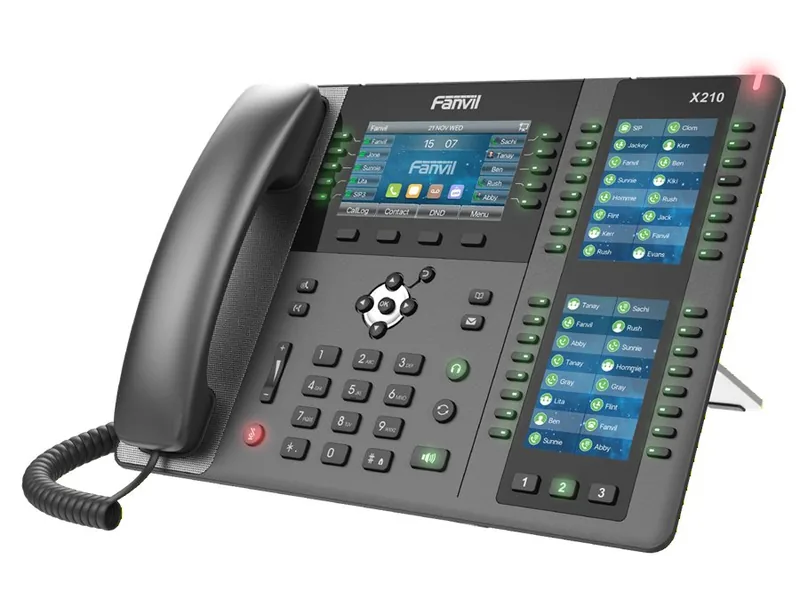
What makes a phone team a call center
Three secretaries answering the phone are still not a call center. A call center begins when there are more calls than available hands, and you need a method: who answers which call, what the person waiting hears, and how you know whether the service is good. The English term Call Center has been replaced in recent years, in many places, by Contact Center — because the center also handles SMS, email and chat, not only calls.
There are two main types. An inbound center (Inbound) answers inquiries: customer service, technical support, orders, an information line. An outbound center (Outbound) initiates calls: sales, fundraising, surveys, reminders. Many organizations do both — in the morning they answer, in the afternoon they dial in a campaign.
A call center does not have to be big. Even four agents at a nonprofit, during an annual fundraising evening, are a call center for all intents and purposes — and if they have no queue and no distribution method, half of the donors will hear a busy signal.
The basic tools
- Waiting queue — the heart of the call center. A caller with no free agent does not hear a busy signal, but waits with music and announcements, in order of arrival.
- Distribution strategy — how the queue chooses an agent: everyone at once, in a fixed order, whoever has been free the longest, or by priorities.
- IVR menu — sorts the callers before the queue: "For sales press 1, for service press 2".
- Live status board — how many are waiting now, how long the longest-waiting one has waited, which agents are free, on a call, or on a break.
- Sign in, sign out and pause — an agent goes on a break and the queue stops sending calls to them, without hanging up the phone.
- Recordings and listening in — for quality control, training and resolving disputes.
- Call log and reports — what happened, when, and where things get stuck.
The metrics worth knowing
A call center is managed by numbers. These are the common metrics in the industry — not everyone needs all of them, but it is worth knowing the names:
| Metric | What it measures | Why it matters |
|---|---|---|
| Average wait time | How long people wait in the queue until answered | The metric the customer feels most |
| Abandonment rate | How many hung up before being answered | Every abandonment is a customer or donor who may not come back |
| Service level | Percent of calls answered within X seconds | A common industry target is a number you set in advance, for example 80% within 20 seconds |
| Average handling time | Call length + wrap-up time after it | The basis for calculating how many agents are needed |
| First-contact resolution | How many inquiries were closed without a repeat call | A measure of quality, not only speed |
A common mistake is to measure only speed. An agent who finishes every call in a minute looks excellent in the report — until you discover that half of their customers call again the next day. Always combine a speed metric with a quality metric.
A cloud call center: agents don't have to sit in the same room
In a traditional call center, all the agents sat in one hall, connected to the PBX in the closet. In a cloud PBX, the queue does not know and does not need to know where the agent is sitting. Some are in the office with an IP phone and headset, some are at home with an app, and some are on a mobile through a SIM extension — all in the same queue, on the same status board.
This opens possibilities that did not exist before: expanding the call center for a single evening without renting a hall, employing agents from home, or continuing to work when the office is closed because of a problem. On the other hand, it requires discipline: every agent needs a stable internet connection, a good headset and a quiet place. An agent answering from a moving car will sound bad, no matter how good the PBX is.
Real-life examples
- A company service center — a menu that sorts into service and sales, two queues, recording of all calls, and an alert to the manager when a customer waited and hung up.
- A nonprofit on a campaign evening — one queue that takes in hundreds of callers in two hours, dozens of volunteers with temporary extensions from home, from a mobile, or from a hall, and the next day the extensions are removed.
- A gemach or information line — defined answering hours, and outside them a recorded message or voicemail.
- A store order center — three agents, a queue with an announcement of the position in the queue, and a callback for those who don't want to wait.
Tips for setting up a call center
- Start from the caller — what they want, and what the shortest path to it is. A menu with seven options and two layers drives people away.
- Define what happens when no one answers — after how many minutes in the queue? Voicemail, a callback, or a transfer to a backup queue.
- Announce the position in the queue — "You are third in line" reduces abandonment more than nice music.
- Decide who manages the status board — someone needs to see that the queue is getting longer and bring in another agent.
- Record and listen — an hour a week of listening to recordings teaches more than any report.
- Know the load — the log will tell you at which hours you need more hands.
One day in a call center of six agents
Let us take the order and service center of a chain of stores for religious articles: six agents, two queues ("Orders" and "Service"), and one shift manager who watches the live queue board. This is what a regular day looks like:
- 08:45 — a five-minute morning update, part of it in a conference room because two of the agents work from home. What is new in inventory, what message went out to customers yesterday.
- 09:00 — the lines open. Each agent signs in to the queue from the control panel. The board shows: 6 agents free, 0 waiting.
- 09:20 — the morning load. The board: 4 on calls, 2 free, 3 waiting, the longest-waiting at 0:50. Still fine.
- 10:30 — peak. 6 on calls, 7 waiting, the longest at 2:10. The manager sees that the "Service" queue is filling up while "Orders" is calm, and moves an agent from Orders to Service for a quarter of an hour — one click on the board. The queue position announcement does its job: two callers chose a callback instead of waiting.
- 11:15 — the board shows one "long" call: 14 minutes. The manager listens quietly for a moment, understands that it is a complicated complaint, and leaves it to the agent. Later she will listen to the recording with them.
- 13:00–14:00 — staggered breaks: two go out, four stay. An agent who goes out pauses themselves in the queue — their phone does not ring, and no call "falls" on them.
- 15:40 — an email alert to the manager: a customer waited and hung up after three minutes. She pulls the number from the call log and asks a free agent to call them back.
- 17:00 — the lines close; outside hours everything goes to voicemail. The daily report: 212 calls, 91% answered, average wait 38 seconds, 11 hung up in the queue — 9 of them between 10:15 and 10:45.
The last number is the lesson of the day: the peak hour is known, and the next day the first agent's break moved from 10:30 to 11:00. A call center is not managed by feel, but by the board and the report.
The metrics in plain words, with the math
The table above gives the names. Here is the math, on the report of that same day — 212 calls:
- Wait time — how much time passed from the moment the caller entered the queue until an agent answered. It does not include time in the menu. An average of 38 seconds sounds good, but the average hides things: if 150 calls were answered within 10 seconds and 30 waited two minutes, the average is still "reasonable". That is why you also look at the longest wait, and at the hour when it happened.
- Abandonment rate — how many hung up before being answered, out of everyone who entered the queue. 11 out of 212 is about 5%. It is customary to exclude hang-ups after a few seconds (dialing mistakes), otherwise the number is inflated. A common rule of thumb: up to 5% is comfortable, above 10% needs attention.
- Service level — the percent of calls answered within a target time. If 170 out of 212 were answered within 20 seconds — 80%. The "80/20" target is common in the industry as a starting point; a fundraising center can live with 70/30, a medical line will demand more.
- Handling time — the call length plus the wrap-up time after it. This is the number that determines how many agents you need, and therefore the only one worth measuring for each agent separately.
Advice from the field: hang one number a month on the wall — for example "abandonment under 5%" — and not five. A team chasing one clear metric improves; a team with a full dashboard of metrics ignores all of them.
How many agents are needed: rules of thumb
The precise method for calculating staffing is called Erlang, after the Danish engineer who developed it for telephone companies in the early twentieth century, and there are free calculators for it. But for most small call centers, a three-line calculation is enough:
- Peak-hour load — how many calls arrive in the busiest hour (from the log), times the average handling time in minutes. 60 calls × 5 minutes = 300 minutes of work per hour.
- Divide by 60 — 300 ÷ 60 = 5 agents working back to back, without a free moment.
- A margin — an agent cannot be on a call 100% of the time; 75–85% occupancy is the reasonable limit. So you add 20–30%: 5 × 1.25 ≈ 6–7 agents at the peak hour.
On top of that, you add what the industry calls "shrinkage": breaks, training, illness. When planning shifts for a whole week, it is customary to assume that 25–30% of working time will not be available for calls. A call center that staffs by the daily average and not by the peak hour will see a long queue exactly when it matters most.
Remote agents: what to check beforehand and what to do when it doesn't work
An agent at home is the same agent in the queue, but their environment is not under your control. Before adding them, a short checklist:
- Connection — wired internet or stable Wi-Fi; a call uses little bandwidth, but it is sensitive to jitter. Test: a five-minute trial call with the manager.
- Equipment — a headset with a microphone, not the computer speaker. Or a SIM extension on a mobile, for someone without a computer or whose mobile is a kosher phone.
- Place — a room with a door. The call is recorded, and the customer hears everything.
- Visibility — the agent needs to know that the manager sees them on the queue board exactly like someone sitting in the office, and that silent listening is a training tool, not surveillance.
| What happens | Common cause | Solution |
|---|---|---|
| The customer hears the agent choppy | Weak Wi-Fi or a heavy download in the same home | A network cable; stop videos on the home network during the shift |
| The agent appears "free" but doesn't receive calls | The app fell asleep in the background, or the extension is not registered | Check in the Extensions screen whether it is registered and from which device; reopen the app |
| Echo or background noise | Open speaker, distant microphone | A headset — almost always the solution |
| Calls "fall" on them during a break | They forgot to pause themselves in the queue | A fixed habit: pause before getting up, not just putting the phone aside |
How it works with us at Kesher
In the Kesher control panel, the Queues screen shows a live picture: how many are waiting, for how long, and which agents are signed in. You add an agent to the queue, remove or pause them — directly from the screen. In the Active Calls screen you can transfer a call, hang it up, or drag it to another extension.
Our queues support distribution to everyone, in order, to whoever has been free the longest, or by priorities, with music and announcements, a queue position announcement and a callback — the system dials the customer when an agent becomes free. A manager can listen to an active call openly or silently.
Agents see in advance which number and which line the call is coming from, so they know how to answer properly even before the "hello". And managers receive an email or SMS alert about a missed call or about a customer who waited and hung up.
Agents can work from an IP phone, from an app, or from a SIM extension — all in the same queue. For campaign evenings we set up temporary extensions for volunteers and remove them the next day.
We accompany the setup of call centers — from a nonprofit on a campaign evening to a permanent service center: planning the menu and queues, the equipment and the recordings.
FAQ
What is the difference between an inbound and an outbound call center?
An inbound call center answers calls that come to it — service, support, orders. An outbound call center initiates calls — sales, donations, surveys. Many organizations combine the two.
How many agents are needed to set up a call center?
There is no minimum. Even two or three agents benefit from a queue, from distribution and from a status board — as soon as there are more calls than available hands.
Can agents work from home?
In a cloud PBX, yes. The agent connects from an IP phone, an app, or a mobile, and enters the same queue as someone sitting in the office.
What do you do with customers who wait a long time in the queue?
You tell them their position in the queue, offer a callback when an agent becomes free, and define an alternative destination — voicemail or a backup queue — after a certain wait time.
What is "80/20 service level"?
A target that says: 80% of calls are answered within 20 seconds. It is a common industry target, not a law. A fundraising center on a campaign evening can settle for less, and an emergency line needs more.
How many calls does one agent answer per day?
It depends on call length. With an average call of four minutes plus one minute of wrap-up, an agent answers around 8–10 calls an hour, and in a workday with breaks about 50–60. Long sales calls — far fewer.
What is wrap-up time?
The minute after the call, in which the agent records what was agreed before the queue sends them the next call. With a CRM connection that summarizes automatically, this time gets much shorter.
What is the difference between a queue and a hunt group in a call center?
A hunt group rings several extensions and whoever picks up first answers; there is no organized waiting and no status board. A queue holds the callers in order, distributes to agents by a chosen method, and measures everything. For three or more agents with a real load — a queue.
Do you have to have an IVR menu before the queue?
No. A call center with a single topic can send callers straight into the queue. A menu is worth it only when there are truly two different teams — for example orders and service — and then it saves transfers.