
PBX for Large Businesses and Chains
Five branches. Two hundred calls a day. One picture.
When every branch lives on its own PBX, management is blind: there is no single national number, no overall view of calls, and every change needs a technician at every site. With us the whole network sits on one system, and the manager sees all of it on one screen.
- Customer dials One national number, not a list of branches
- Smart routing By menu choice, by region or by time of day 1 Orders2 Service3 Branches
- Waiting queue Music, announcements and queue position until an agent is free
- An available agent answers In any branch. The customer does not know and does not need to know
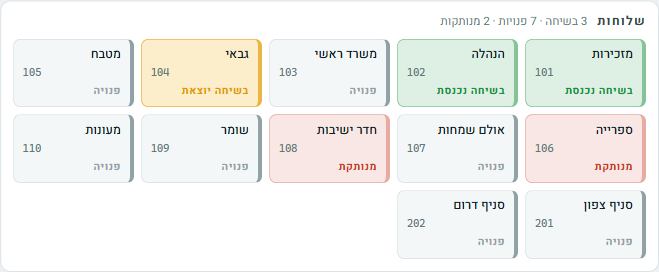
- And management sees it Live calls, load and recordings in real time
What happens when all branches are on one system
Internal dialing between branches: no cost and no phone numbers
An employee at the Jerusalem branch dials three digits and reaches the warehouse in Bnei Brak. Transferring a call between branches is just like transferring between rooms. The customer is not disconnected, does not dial again and does not repeat the story from the start.
Queues and hunt groups that spread the load
Service calls enter one queue, and all agents, in all branches, answer from it in order. If a department is busy, calls overflow to another department after a time you set. Peak hours stop being a gamble.
Organizational change without a round of technicians
Opening a branch? Set it up in the system and connect phones. There is no special infrastructure to build. Departments merged? Change the routing in the control panel. What used to be a project of weeks becomes a fifteen-minute decision.
Working from home: a full part of the call center
An agent working from home connects from software on a computer or an app on a mobile, joins the same queues and answers from the same company number. In the control panel they look exactly like an agent sitting in the office, because as far as the system is concerned, they are one.

What a manager sees when opening the control panel
What operations managers and IT managers ask
We have hybrid employees who also work from home. How does that work?
An extension at home behaves exactly like an extension in the office: the same internal number, the same queues, the same transfers. The employee connects from software on a computer or an app on a mobile, and the manager sees them in the control panel like any other extension.
How many extensions and simultaneous calls can the system handle?
The system is built for organizations with hundreds of extensions and call center call volumes. The cloud infrastructure scales as needed. There is no point at which you have to replace the PBX because you grew.
Can a branch manager see only their own branch?
Yes. Permissions in the control panel are set by role: management sees the whole network, a branch manager sees their branch, and an agent sees what their work requires. Each permission is controlled separately.
We have an old physical PBX. How do we switch without shutting down the phones?
The move is gradual: we set up the new system alongside the old one, move one department at a time, and only at the end port the main numbers. The phones do not stop answering, not even for a day.
Related
A short planning session, a clear answer
We will go over your network structure (branches, departments, hours and loads) and come back with a detailed migration plan and a price quote. No surprises along the way.
077-921-9000