What is an analog phone line?
An analog line is the classic phone line: a pair of copper wires running from the phone company's exchange to the wall. It carries one call at a time, and it is fading away in favor of internet telephony.
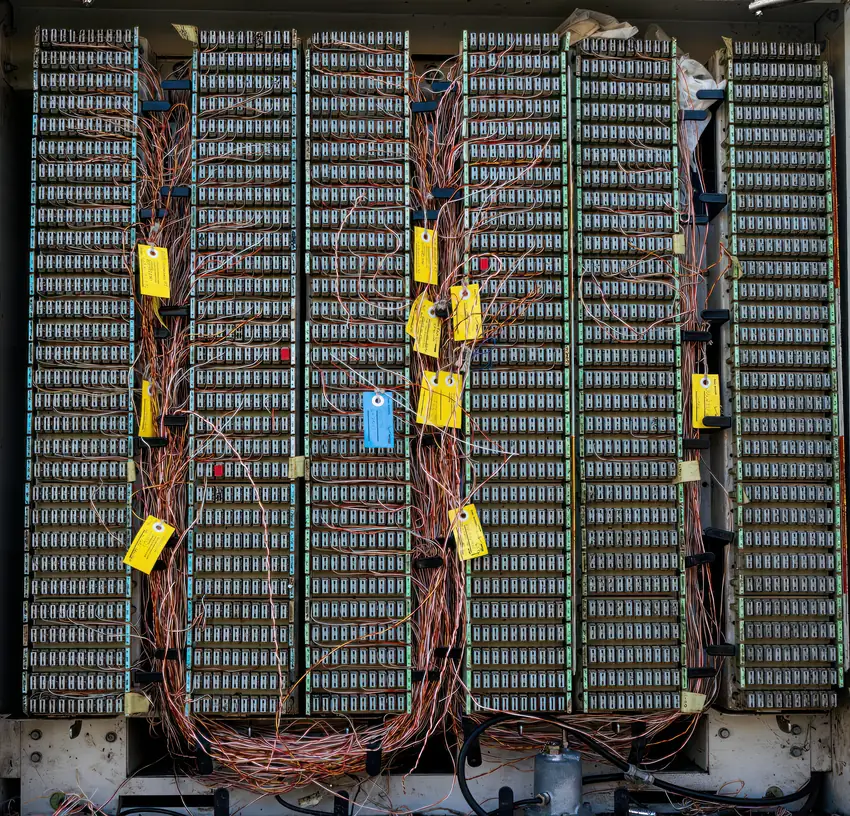
What an analog line is
An analog line is a pair of thin copper wires that leaves the phone company's exchange, runs under the street inside a thick cable that holds hundreds of such pairs, and enters the building up to the jack on the wall. Around the world it is affectionately called POTS — Plain Old Telephone Service. The whole network that connects all these lines is called the PSTN — the public switched telephone network.
The word "analog" describes the way the voice travels. The microphone in the handset turns vibrations in the air into an electric current that changes exactly like the voice: a loud voice — a big change, a high voice — a fast change. This current is an "analogy" of the voice, hence the name. On the other end, the speaker turns the current back into sound.
A short history of the copper line
The telephone was patented in 1876, and in the first years every pair of subscribers was connected by a wire of its own. It quickly became clear that this does not hold up, and exchanges were born: a room where all the neighborhood's lines arrive, with operators who connected by hand — with cords and sockets — the caller and the person they asked for.
Over time the operators were replaced by automatic switches. The rotary dial sent electrical pulses — the digit 3 is three short breaks in the current — and the switch at the exchange counted them. In the 1960s tone dialing (DTMF) appeared, in which each key plays a combination of two tones. This is the same method by which an IVR menu recognizes today which key you pressed.
Later in the twentieth century the exchanges themselves went digital: the voice still traveled in analog form over the wire to the home, but at the exchange it was converted to digits and traveled over a digital network between exchanges. In other words, for decades the "analog" part has been only the last stretch — from the neighborhood exchange to the wall.
Today many operators around the world are pushing a move from copper to optical fiber, and in many places a "home" phone line is already a digital service that runs over the internet, just with a jack that looks like it used to.
How the line works technically
The analog line is a circuit: when you lift the handset, an electric circuit closes between the phone and the exchange, and the line is reserved for this call until you hang up — even in moments of silence. This is the essential difference from VoIP, where the voice is split into packets that share the network with other data, as you can see in the lower part of the diagram.
- Power from the line — the phone company's exchange supplies a constant voltage on the wire. This is why a simple analog phone kept working even during a power outage at home.
- Ringing — to make the phone ring, the exchange briefly sends a higher voltage that activates the bell.
- Narrow range — the line carries only the frequencies of basic speech, roughly between 300 and 3,400 Hz. This is why on an old phone it is hard to tell "s" from "sh," and music sounds flat.
- One call — one pair of wires carries one call. A business that wanted five calls at the same time needed five lines.
Why people move away from it
- Every line is infrastructure and a payment — one more simultaneous call means one more line, one more monthly charge, and sometimes one more technician.
- Tied to an address — the line is in the wall. Did you move offices? The lines have to be moved too, and at home you cannot simply answer the work line.
- No features — a queue, recording, time-based routing or voicemail to email require a PBX and additional equipment.
- Limited quality — the narrow range of the line does not allow HD audio.
- Maintenance — old copper cables suffer from moisture and rust, and a fault in the line can take a while to fix.
The big advantage the analog line had — working during a power outage — is fading anyway, because most lines now pass through equipment at home or on the street that needs electricity. In the cloud, this can be solved differently: the PBX is not in the office, and during a fault it forwards the calls to a mobile.
And what about the old phones
An analog phone does not have to go in the trash. An SIP adapter (ATA) is a small box with a network jack on one side and a regular phone jack on the other. You connect the old phone to it, connect it to the network, and the phone becomes a regular extension on the cloud PBX — with an extension number, transfers and queues.
- A single phone — an adapter with two jacks is enough for one or two phones.
- Several rooms — adapters with four or eight jacks serve several phones from the same point.
- A whole building with old wiring — a large analog gateway can connect dozens of existing internal lines at once, without running network cables to every room.
This is a common solution in yeshivas with dormitories, in nursing homes and in old buildings where there is already phone wiring in every room. The difference between the types of jacks is explained in the article on FXS and FXO. For an old fax machine you can try the same route, but a fax is sensitive to network quality, and a virtual fax is often better. Before deciding, it is worth going room by room and noting which devices are actually in use — sometimes it turns out that half of the old phones are no longer needed.
A migration story: from four copper lines to a cloud PBX, step by step
A housewares store in Bnei Brak, three employees, four copper lines entering the wall behind the register: a main line, a second line for "when busy," a line for the fax, and a fourth line that no one remembers the reason for anymore. In the wall is a small PBX from twenty years ago, whose technician has long since retired. This is what the migration looked like, week by week.
- Week 1 — taking inventory. You go over every jack and note what is connected to it: three phones, a fax, an old credit card terminal, and an alarm system that dials the monitoring center through the fourth line — there is the reason it exists. For each number you check who publishes it: the main number is printed on the bags and in ads, the second one does not appear anywhere.
- Week 1 — the internet. The store browses through the same copper cable as the main line (an ADSL connection). This is the stage where many people stumble: if you cancel the line, the internet disappears too. So you order a separate internet connection first, fiber or cable, and only after that do you touch the lines.
- Week 2 — decisions. The main number is moved by porting. The second number is not ported — on a cloud PBX, "when busy" does not need another line but another channel. The fax becomes a virtual fax on the same number. The credit card terminal is replaced with a terminal that works over the network, and the alarm moves to a cellular communicator — both of these do not work well over internet telephony, and it is better not to try.
- Week 2 — equipment. Three pre-configured IP phones arrive, and a small adapter for the old cordless phone in the storeroom — it stays, because it works and the store owner likes it.
- Week 1 — taking inventory. You go over every jack and note what is connected to it: three phones, a fax, an old credit card terminal, and an alarm system that dials the monitoring center through the fourth line — there is the reason it exists. For each number you check who publishes it: the main number is printed on the bags and in ads, the second one does not appear anywhere.
- Week 1 — the internet. The store browses through the same copper cable as the main line (an ADSL connection). This is the stage where many people stumble: if you cancel the line, the internet disappears too. So you order a separate internet connection first, fiber or cable, and only after that do you touch the lines.
- Week 2 — decisions. The main number is moved by porting. The second number is not ported — on a cloud PBX, "when busy" does not need another line but another channel. The fax becomes a virtual fax on the same number. The credit card terminal is replaced with a terminal that works over the network, and the alarm connects through a dedicated alarm adapter — so it keeps dialing the monitoring center even after the move to the cloud, and you check with them that the call gets through.
- Week 2 — equipment. Three pre-configured IP phones arrive, and a small adapter for the old cordless phone in the storeroom — it stays, because it works and the store owner likes it.
The story continues: the week of the switch and what happens after
- Week 3 — working in parallel. The new phones are already connected to the cloud PBX with a temporary number. For a few days the store works with two systems: incoming calls still arrive on the copper lines, and outgoing calls already go out from the new phones. This is how you test audio quality, caller ID and the IVR menu without a single customer noticing.
- Porting day. The previous provider transfers the main number. From the moment of approval, incoming calls reach the cloud PBX, and from there the menu, the phones and the store owner's mobile after business hours. The old line goes silent — and that is fine, because the number is already somewhere else.
- Week 4 — cleanup. Only now, after the port has been completed and verified, do you cancel the three remaining lines with the old operator. The old PBX comes down off the wall.
- A month later. The store owner discovers that he can see in the call log how many customers called while the store was closed — information he never had — and adds a message about opening hours using time-based routing.
The diagram shows the porting path: the number moves from the old provider to the new one, and at any moment it rings in only one place. This is why the order matters — first you set up the new system, then you port, and only at the end do you cancel.
What changed in the monthly bill: instead of four lines with a fixed payment for each, one payment for the PBX and the channels. And what changed in the work: the same three phones, the same number, but with a menu, voicemail to email, and answering from a mobile when the store is closed.
Common mistakes when moving away from copper, and numbers worth knowing
- Canceling the line before the port is complete. The number of a canceled line goes back to the operator's pool, and sometimes it cannot be recovered. Cancel only after the new number is already answering.
- Forgetting who else is on the line. An alarm, an elevator, a credit card terminal, a door intercom, an old time clock — all of them once dialed through an analog line. Each one now has a replacement on the network or on cellular, but you need to find it before the day of the switch.
- Disconnecting the line that feeds the internet. An ADSL connection runs on the copper pair of the phone line. Canceling the line also cuts off browsing — and with it the new PBX.
- Connecting a fax to an adapter and being surprised. An analog fax over internet telephony works sometimes and sometimes not. Anyone for whom the fax matters moves to a virtual fax.
- Keeping the old PBX "just in case." Two systems in parallel over time are a source of confusion: who answers which number, and why a call does not appear in the log.
A few numbers that help in understanding the old line: the phone company's exchange sends a direct voltage of about 48 volts over the wire when the handset is down, and to ring, it sends an alternating voltage of about 75–90 volts — enough to feel a tingle if you touch the wires at that moment. The rotary dial sent ten pulses per second, so dialing the digit 0 (ten pulses) took a whole second. A copper pair reaches a distance of a few kilometers from the neighborhood exchange before the voice weakens too much, which is why every large neighborhood has its own exchange. And this entire line carries one call, at an audio bandwidth of about three thousand hertz — less than a tenth of what a healthy ear hears.
- Canceling the line before the port is complete. The number of a canceled line goes back to the operator's pool, and sometimes it cannot be recovered. Cancel only after the new number is already answering.
- Forgetting who else is on the line. An alarm, an elevator, a credit card terminal, a door intercom, an old time clock — all of them once dialed through an analog line. Each has a solution — the fax and the alarm through a dedicated adapter, and the rest a replacement on the network — but you need to find them before the day of the switch.
- Disconnecting the line that feeds the internet. An ADSL connection runs on the copper pair of the phone line. Canceling the line also cuts off browsing — and with it the new PBX.
- Connecting a fax to an adapter and being surprised. An analog fax over internet telephony works sometimes and sometimes not. Anyone for whom the fax matters moves to a virtual fax.
- Keeping the old PBX "just in case." Two systems in parallel over time are a source of confusion: who answers which number, and why a call does not appear in the log.
How it works with us at Kesher
When you move to us, we port your existing line numbers — we submit the porting request and accompany it to the end. Porting usually takes a few days, depending on the previous provider, and in the meantime the old lines keep working.
Old phones you want to keep connect through Grandstream adapters: the HT802 with two jacks, the HT814 with four and the HT818 with eight. For a building with many old internal lines there are also GXW gateways. The equipment arrives pre-configured, and every old phone becomes an extension in the control panel.
In the control panel you see for each extension whether it is registered and from which device — so you can tell right away whether the adapter in a given room is connected. For each extension the system generates a strong password.
Old fax machines can be connected the same way, or dropped in favor of a virtual fax: you send a fax from a PDF, Word or image file in the browser, and an incoming fax arrives by email.
The two things that worry people most when moving away from a copper line — the fax and the alarm — are handled with us through a dedicated adapter, not a regular one: the connection is stable, and the existing devices keep working. An incoming fax can arrive both by email and at the machine, so it is printed right away and also saved as a file.
FAQ
Can I use an old phone with a cloud PBX?
Yes. You connect it to a SIP adapter, and the adapter connects it to the network. The phone becomes a regular extension.
Why does an old phone sound "flat"?
The analog line carries only a narrow range of frequencies, enough for basic speech. Internet telephony with an HD codec carries a wider range.
Does an analog line work during a power outage?
A classic copper line got its power from the phone company's exchange, and so it worked. Today most lines pass through equipment that needs electricity, so this advantage has almost disappeared.
Can I keep the number of the old line?
Yes. You port the number to the new provider, and it keeps ringing — only through the new PBX.
I have an alarm that dials through the phone line. What do I do with it during the move?
Do not connect it to a regular adapter — the alarm transmitter is sensitive to line quality and may fail to dial in real time. Alarm companies provide a cellular or network transmitter, and it is worth switching to it before you cancel the line.
How long do the two systems work in parallel?
Usually a few days to a week: the new PBX comes up with a temporary number, you test it, and only then do you port the main number and cancel the old lines.
My internet runs over the phone line. Can I cancel the line?
Not before you have another internet connection. An ADSL connection rides on the line's copper pair, and canceling the line cuts it off too. Order an independent connection first, and only then cancel.