What Are FXS and FXO?
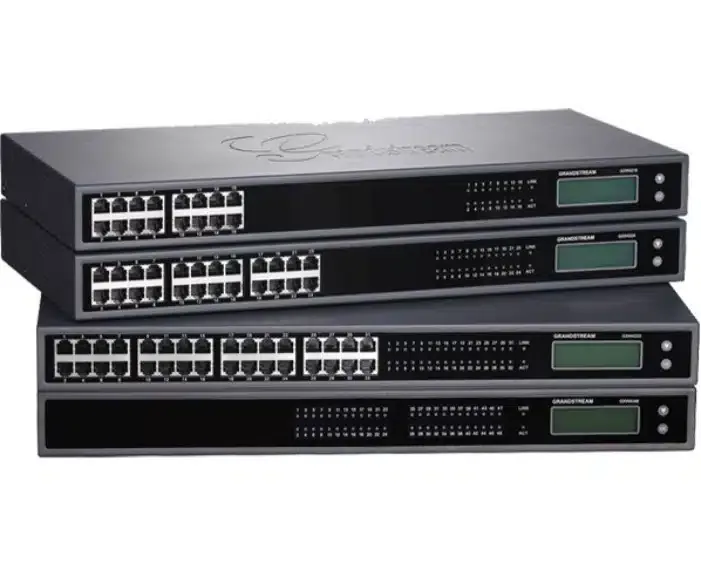
FXS and FXO are two types of analog connections in telephony equipment. You connect a phone to an FXS (Foreign Exchange Station), and it "gives it a tone"; you connect an existing phone line to an FXO (Foreign Exchange Office), and it behaves like a phone. A gateway with many FXS ports connects dozens of old phones to the network at once.
Two ends of the same wire
Every analog phone line has two ends. One end is the phone company's exchange: it supplies voltage to the line, sends a ring signal when someone calls, and plays a dial tone when you lift the handset. The other end is the phone: it receives all of these, and tells the exchange when it was picked up and which digits were dialed.
FXS and FXO are simply the names of the two ends. The names come from the English terms Foreign Exchange Station and Foreign Exchange Office — a "station" (the user's device) and an "office" (the phone company's exchange). When the two ends meet — an FXS port facing a device, or an existing line facing an FXO input — everything works. When two identical ends meet, there's no tone and no call.
How to remember
- FXS — S as in Station, a device. This kind of port replaces the phone company: you connect a phone, fax or intercom to it, and it gives them tone, ring and voltage. Every SIP adapter is really a box with FXS ports.
- FXO — O as in Office, the exchange. This kind of input replaces the phone: you connect a phone line that comes from outside, and it "lifts the handset", dials and answers in place of a device.
A rule of thumb: if the wire in your hand comes from a device, it goes to an FXS. If the wire in your hand comes from the wall, from a phone company line, it goes to an FXO. A reversed connection usually won't cause damage, but it won't work either.
What a telephony gateway is
A gateway is equipment that sits between the old world of wires and the network. It does exactly what a small adapter does — translates between electrical signals and VoIP calls — but on a large scale: 16, 24, 32 or even more ports in one box, installed in the network rack.
There are gateways with FXS ports only (for connecting many phones), gateways with FXO inputs only (for connecting existing lines), and combined gateways. There are also gateways for old digital lines, but these are rare today in small businesses and institutions.
From the cloud PBX's point of view, every FXS port on a gateway is a separate extension. A gateway with 32 ports = 32 extensions, each with its own name, voicemail and routing.
The classic case: a building with old wiring
Imagine a yeshiva with a three-story dormitory, built thirty years ago. Every room has a phone jack, and all the wires run down to one patch panel in the basement — where the old PBX once stood. Now you're moving to a cloud PBX. What do you do with the forty rooms?
- Option A: run network cables to every room. Days of work, open walls, high cost — and then buying an IP phone for every room.
- Option B: an FXS gateway in place of the old PBX. You connect the existing wiring to the gateway's ports, connect the gateway to the network, and the simple phones in the rooms keep working. Every room is an extension.
Option B saves most of the work, and it's especially suitable for rooms that only need a simple phone: a dormitory, hotel rooms, classrooms, stairwells. For stations that handle a lot of calls — management, the secretary's office, reception — it's still better to run a network cable and install an IP phone.
And what about FXO in a cloud world
In the past, FXO inputs were very common: you connected the phone company's analog lines to the gateway, and the PBX could use them for incoming and outgoing calls.
In a cloud PBX this is less necessary. Calls arrive over the internet, through SIP trunks, and the numbers themselves move through porting. Instead of leaving a physical line at the office, the number moves to the cloud and works from anywhere.
Still, there are cases where FXO is still used: an analog line that can't be ported, an old backup line, or a legacy system that must sit on a real line. These are cases to examine one by one, not the default.
What to check before installing a gateway
- Where the wires arrive. If all the rooms arrive at one point — excellent. If the wiring is split between several panels, you may need two gateways or small adapters in several places.
- The condition of the wiring. An old wire that was cut, a broken jack, a loose connection in the panel — a new gateway won't fix that. It's worth testing every point with a phone before the day of the move.
- Labeling. An old patch panel usually has no labels. Before connecting, mark which pair of wires goes to which room — otherwise "extension 312" will ring in room 205.
- Backup power. The gateway powers all the phones. If it goes off, the whole building is silent. A UPS in the network rack is a must.
- Special devices. Faxes, intercoms, an elevator phone, an alarm system — list them separately and test each one.
A quick comparison
| FXS | FXO | |
|---|---|---|
| What you connect | Phone, fax, intercom | Existing phone line |
| Who supplies the tone | The port gives tone to the device | The line gives tone to the input |
| Behaves like | The phone company | Phone |
| Common use today | Old phones, dormitories, fax | Lines that weren't ported, special cases |
| Where you'll find it | SIP adapters, gateways | Gateways, old PBXs |
A full example: a building with 40 analog phones moves to the cloud
Take a made-up institution: a boarding school, four floors, 40 phone jacks — classrooms, dormitory rooms, a kitchen, a front gate, a secretary's office. The old PBX has stood in the basement since the nineties and is starting to act up. Management wants a cloud PBX, but doesn't want open walls. Here's what the move looks like, step by step.
- Survey (a week before). Go through all 40 jacks with a simple phone and connect it to the patch panel in the basement, pair by pair. Record in a table: the pair number on the panel, the room, whether there's a tone, whether the jack is intact. A survey like this almost always turns up two or three dead pairs and a few jacks that nobody remembers where they lead.
- Sorting the points. Not all 40 points are equal. The secretary's office, the principal and the teachers' room get an IP phone on a network cable (only three or four new points). The dormitory rooms, the kitchen and the front gate stay on the old wiring. That leaves 36 analog points.
- Sizing the gateway. 36 active points plus a reserve of about 20 percent: two gateways with 24 FXS ports each (48 ports) are better than one with 32 and no room to grow. Two gateways also mean that a failure in one silences half the building, not all of it.
- Reusing the wiring. The old wires stay in place. On the patch panel, you connect each pair to a short cable that goes to a specific FXS port, and write it on a sticker: pair 17 = room 214 = gateway A port 5. That record is what will save you in two years.
- Move day. Do it in the afternoon, floor by floor. The old PBX is still connected to the floors that haven't been moved yet. In each room that's been moved, dial from extension to extension and from a mobile to the room, and mark it in the table. If something doesn't work on one floor, you can put it back on the old PBX within minutes, because the wires weren't touched.
- The next day. The main number has already been ported to the cloud, time-based routing is set up, and the old PBX is finally disconnected.
The total time for a project like this is usually a few working days, and most of it goes to the survey and labeling — not to the connection itself. Anyone who skips the survey discovers the dead pairs on move day, in front of a room full of students.
What connects to what: a table with examples
The following table goes through the devices and lines that actually meet in an old building, and says which side each belongs to:
| What you have in hand | Where it connects | Note |
|---|---|---|
| A simple phone in a dormitory room | FXS | The regular case. Every port = an extension |
| An old fax machine | FXS | Works, but needs special settings in the gateway; it's usually simpler to move to a virtual fax |
| An intercom at the front gate | FXS | The intercom "dials" an extension when the button is pressed |
| An elevator phone | Usually not moved | An emergency line — check with the elevator company before touching it |
| An analog line from the phone company that hasn't been ported yet | FXO | The cloud PBX uses it until the porting is complete |
| An extension port of an old PBX that stays for a transition period | FXO | The two PBXs "talk" over this pair; a temporary solution only |
| An alarm device that dials a monitoring center | FXS, with caution | Check that the device manages to dial through the gateway; if not, leave it on a separate line |
Note the elevator row and the alarm device row. These are devices that someone relies on at the moment of truth, and in a building moving to the cloud they need an explicit decision — not "let's connect it and see".
Common mistakes when working with gateways
- Connecting two phones in parallel to one port. An FXS port is usually meant for one device. Two devices on the same pair will ring together, but on some gateways the ring gets weaker or disappears, and whoever picks up second gets the first one's call. If you need two rooms on one extension, it's better to use two ports and a hunt group.
- Wires that are too long. Old wiring that runs hundreds of meters between buildings can give a weak tone and weak ringing. The solution is a small gateway or an adapter closer to the far end, not one gateway in the center trying to reach everywhere.
- Forgetting the fax setting. A fax through a gateway works only when the settings are adjusted for fax; a fax connected "like a phone" will send one page and get stuck on the second.
- Giving every port a voicemail box. 36 dormitory rooms don't need 36 voicemail boxes that nobody will listen to. It's better to set it so that when nobody answers in a room, the call goes back to the secretary's office or to a message about contact hours.
- Skipping the labeling. A gateway with 24 identical cables and no stickers is a mystery by the next day.
- Connecting the gateway without a UPS. In a power outage the gateway goes off, and all the phones behind it go silent. In a cloud PBX the calls themselves aren't lost — they can go to a mobile or to voicemail — but nothing will ring in the building.
When something doesn't work: symptom, cause, fix
| The symptom | The common cause | What to do |
|---|---|---|
| No dial tone in the room | A pair disconnected on the panel, or a port that wasn't set up as an extension | Test the pair on the panel with a phone; check in the control panel whether the extension is registered |
| There's a tone, but dialing doesn't work | The old phone dials with pulses and not tones | Replace it with a tone-dialing device, or enable pulse dialing support in the gateway if it exists |
| The phone doesn't ring on an incoming call, but you can dial out from it | Several devices on the same port, or an old mechanical bell that needs more voltage | Keep one device per port; replace the device |
| Weak sound or noise | A long wire, a corroded connection on the panel, a pair running next to a power cable | Redo the connection on the panel; shorten the route; consider an adapter closer to the end |
| The whole building went down at once | The gateway shut off, lost its network, or lost its registration with the PBX | Check power, the network light, and the state of the extensions in the control panel — all the gateway's extensions will show as unregistered together |
| Extension 312 rings in room 205 | Pairs mixed up on the panel | Go back to the survey table and fix the labeling — not the PBX |
The simple rule: a problem in one room is almost always the wiring or the device. A problem in all the rooms at once is the gateway or the network. This distinction saves half the time of every investigation.
How it works with us at Kesher
In buildings with many analog phones — dormitories, institutions, older buildings — we install a Grandstream GXW series gateway in the network rack and connect the existing wiring to it. That way there's no need to run new cables to every room, and the simple phones keep working.
The gateway arrives preconfigured, and every port on it is a regular extension on the PBX. In the "Extensions" screen of the control panel you give each one a name ("Room 12", "Second Floor"), and you see whether it's registered.
For students' rooms you can combine these extensions with a student phone, which allows dialing only to approved numbers. At the dormitory station you can set it not to ring during seder, and callers hear a message about contact hours.
When needed, we also set up the network rack itself: a patch panel, a switch, a router, a UPS and labeling of every point — so the gateway sits in an orderly, protected place.
FAQ
What's the difference between FXS and FXO in one sentence?
You connect a phone to an FXS, and it gives the phone a tone; you connect a phone line to an FXO, and it behaves like a phone.
Can I use the old phone wiring with a cloud PBX?
Yes. You connect the wiring to a gateway with FXS ports in the network rack, and the gateway connects to the network. Every room becomes an extension without running new cables.
Do I need an FXO input to move to a cloud PBX?
Usually not. Calls arrive over the internet and the numbers move through porting. FXO is needed only in special cases, such as a line that can't be ported.
What happens to the phones when the gateway shuts off?
All the phones connected to it stop working. That's why a UPS in the network rack is important, and in a cloud PBX you can set an alternative destination for calls — a mobile or voicemail.
How many phones can I connect to one FXS port?
One device is recommended. On some gateways two in parallel are possible, but the ring gets weaker and you can't tell who answered. For two rooms on one extension, two ports and a hunt group are better.
Does an old fax work through an FXS gateway?
Usually yes, provided the port is set up specifically for fax. In many cases it's simpler to move to a virtual fax: you send from the browser and receive by email, with no device and no paper.
What gateway size should I choose?
Count the points that actually remain analog after the important stations move to IP phones, and add a reserve of about 20 percent. In a large building, two medium gateways are better than one large gateway.
Can the move be done without taking the phones down?
Yes, when you work floor by floor. The old PBX keeps serving what hasn't been moved yet, and every floor that's moved is tested before you continue. If something doesn't work, you put the floor back to its previous state within minutes.