What is BLF?
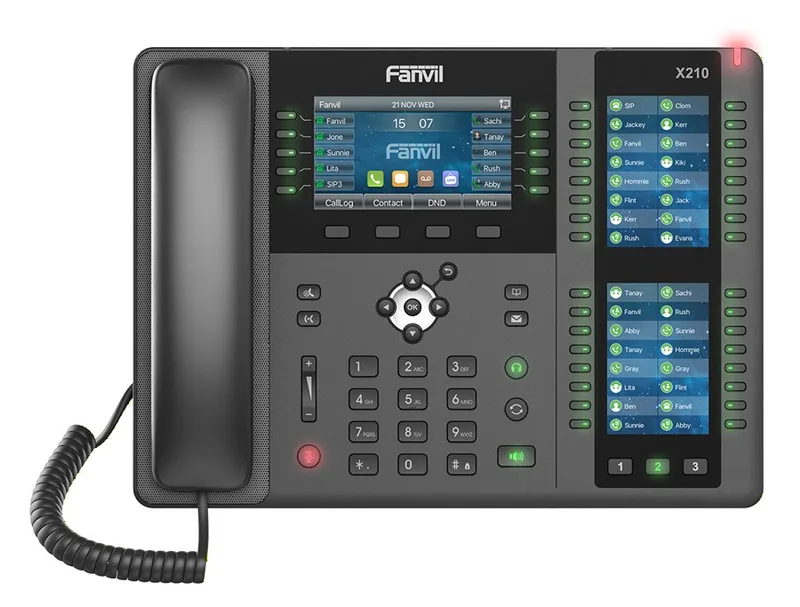
BLF (Busy Lamp Field) are keys with lights on the phone that show the status of other extensions: free, ringing, or on a call. Pressing the key dials the extension or transfers a call to it.
Where it comes from
In the past, at the switchboard operator's desk in a large office, there was a panel with rows of small lamps — a lamp for each line or each room. A lit lamp meant the line was busy. The operator could see at a glance who was talking, and could decide where to send the next call. The English name, Busy Lamp Field, describes exactly that: a field of "busy" lamps.
Today that panel has moved to the phone itself. An IP phone has a row or several rows of keys with a small light next to each one. Each key is set to a specific extension — "Sarah, Accounting," "Extension 205" — and its light shows what is happening there right now.
How it works behind the scenes
The phone does not "see" the other extensions on its own. When you set a BLF key on it, it sends the PBX a request: "Update me every time the status of extension 205 changes." In the language of the SIP protocol, this is called a subscription for updates (Subscribe).
From that moment, the PBX sends the phone a short message at every change: extension 205 started ringing, answered, finished. The phone turns the light on and off accordingly. All of this happens within a second, so the light reflects the real situation almost in real time.
This is also why BLF keys work only between extensions of the same PBX: the PBX knows what is happening on its own system, but not what is happening on someone's private mobile phone.
What the colors mean
The exact colors vary between manufacturers and models, but on most phones:
| The light | What it means | What you can do |
|---|---|---|
| Green / off | The extension is free | Dial or transfer a call to it |
| Solid red | The extension is on a call | Wait, or transfer to voicemail |
| Flashing red | The extension is ringing | On some phones — press to answer in its place |
The ability to answer a call that is ringing at someone else's extension is called Call Pickup. It is very useful when someone has stepped out of the room: you see that their extension is flashing, you press — and the call is with you.
Who needs it
- Reception and secretaries — dozens of calls a day that need to be transferred. Without BLF, every transfer starts with "One moment, let me check if he's free." With BLF you see in advance, and transfer with one press.
- A manager and a personal assistant — the assistant sees whether the manager is on a call, and decides whether to transfer or take a message.
- A small team that covers for each other — in an office of five people, everyone sees everyone else, and answers for whoever stepped out for a break.
- Yeshiva office staff — the secretary sees whether the rosh yeshiva, the administrator or the mashgiach is on a call before she transfers a parent to them.
For an employee who almost never transfers calls — there is no need. A simple phone without extra keys will do.
There is also a quieter benefit: when everyone sees everyone, fewer calls "fall between the chairs." Someone who sees a colleague's extension ringing again and again with no answer can pick up for them or check what happened — instead of the customer giving up and hanging up.
Transfer with one press: two types
When you are on a call and press a BLF key, there are two ways to transfer, depending on the phone's settings:
- Blind transfer — the call goes through immediately, without you speaking to the person receiving it. Fast, suitable when the light is green and you know they are waiting for the call.
- Attended transfer — you first speak with the other extension ("I have the supplier here, will you take it?"), and only then transfer. More polite, suitable for important customers.
Both types are covered in more detail in the article on call transfer.
How many keys you need
A regular desk phone usually has several keys that can be programmed. On touchscreen phones the keys appear on the screen, sometimes across several pages. A reception desk or call center has phones with dozens of keys, and you can also add an expansion module next to the phone — a separate panel made entirely of extension keys.
A simple rule: count how many extensions the desk regularly transfers calls to, and add a few for growth. You do not need a key for every employee in the organization — only for the ones people actually transfer to.
Those same keys can hold more than extensions: also a speed dial to an external number that is dialed often, a key for voicemail, or a key that transfers to a group.
Tips and common mistakes
Before ordering phones, it is worth sitting down with the person at reception and asking her who she transfers to most. The answer is almost always different from what the manager thinks, and it determines how many keys you need and in what order.
- A logical order. Arrange the keys by department or by frequency — not by the order in which they were set up.
- Short names. The display has room for only a few letters. "Yaakov Accounts" is better than "Yaakov Cohen — Accounting and Payroll."
- Update when someone leaves. A key showing the extension of an employee who no longer works there is confusing. When you change the team, update the keys too.
- Do not rely on color alone. A green light means the extension is not on a call, not that the person is at the desk. That is why every extension should have a fallback destination for when no one answers.
Example: a key layout for a reception phone
Let's take a made-up accounting office with twelve employees and one receptionist. Her phone has 16 programmable keys. Here is a layout that works, and why:
| Key | Label on the display | Type | Why here |
|---|---|---|---|
| 1 | Manager | BLF | The most transfers, and the most important to know whether he is on a call |
| 2 | Partner | BLF | Same as above |
| 3–6 | Yaakov, Rachel, Moshe, Dina (audit department) | BLF | The team that receives most customer calls |
| 7–9 | Payroll A, Payroll B, Payroll C | BLF | A second department, one group per row |
| 10 | Accounts — Group | A hunt group key | When it does not matter who in the department answers |
| 11 | Meeting room | BLF | To know whether the room is occupied before transferring there |
| 12 | Courier | Speed Dial | An external number that is dialed several times a day |
| 13 | Voicemail | Feature key | One-press access to messages |
| 14 | Park 1 | Call Park | To hold a call that anyone can pick up from any phone |
| 15–16 | Free | — | Spare for a new employee |
Notice three things. The keys are arranged by department, not by extension number — the receptionist's hand learns a place, not a number. The names are short, because the display has room for only a few letters. And two keys were left empty on purpose: a layout that is filled to the end on the first day starts to get messy in the second week.
Call pickup etiquette
Call pickup is an excellent tool, and without rules it is a source of friction. Yossi's extension is ringing, three people see the light flashing — who presses? And what do they say to the caller? A few rules that teams commonly agree on:
- When to press. Not on the first ring. Give it two or three rings, so that someone who only stepped out for a moment has time to return. If the extension is set to move to a mobile phone or voicemail after a short time — pick up before then, otherwise the caller is already at the mobile phone.
- Who presses. Agree in advance: whoever is physically closest, or whoever is in the same department. In a pickup group where anyone can answer for everyone, this still requires an agreement, otherwise everyone waits for someone else to answer.
- What to say. "Yossi's office, he's away from his desk, can I help you?" — and not "Hello." The caller expected Yossi, and it is important that they understand right away that they reached the right place and why someone else answered.
- Take a real message. Name, number, subject, time. A message that was not delivered is worse than a call that was not answered, because the caller is sure they were taken care of.
- What not to pick up. The manager's extension, a private line, or an extension that was agreed to go straight to voicemail. A BLF key shows that it is ringing, but that is not an invitation.
- Do not "steal" calls. If Amit's extension is flashing and he is on his way to it, pressing the key grabs his customer from him in the middle. Take one look around before you press.
Worth knowing: in the PBX call log, each call is recorded once with its route, including who finally answered. That way Yossi can see in the morning that the supplier's call was picked up by Dina, and go ask her — instead of being sure that no one answered.
When the lamps lie: symptom, cause, solution
| The symptom | The common cause | What to do |
|---|---|---|
| All the lights are off, even for extensions that are on a call | The phone failed to subscribe for updates — usually after a network disconnection | Restart the phone; check that the extension is registered in the control panel |
| One light is always off | The key is set to an extension number that does not exist, or to the extension of an employee who left | Correct the extension number on the key |
| The light shows "on a call" when the employee is not talking | A "stuck" call on the extension, or the extension is ringing on a mobile phone through Follow Me | Check the active calls screen; if the call is on the mobile phone — the light is right |
| Pressing a flashing key does not pick up the call | The pickup code is not set on the phone, or the extension is not in the same pickup group | Ask the provider to add the code to the key |
| The light updates a few seconds late | Normal — that is how the update mechanism works | Nothing. A delay of minutes is already a fault |
| A transfer using the key goes straight to voicemail | The extension is set to "Do Not Disturb," or it is on a call and the light is still green | Look at the light a moment before the transfer; check the extension's settings |
How BLF fits into the rest of the system
- With a waiting queue. An agent's light shows whether they are on a call, but not whether they are "in the queue" or have paused themselves. The full picture of the queue — how many are waiting, who is available — is seen on the Queues screen in the control panel, not on the keys.
- With a hunt group. When a call rings in the group, all the extensions in the group flash together. Whoever sees this from reception knows a call is waiting, even without hearing a ring.
- With speed dial. The same physical keys, but with no light that means anything. A good combination: internal extensions with lights in the top rows, external numbers in the bottom rows.
- With the "Active Calls" screen. BLF is the live picture on the phone; the screen in the control panel is the same picture for whoever sits at the computer, with the ability to transfer and disconnect from there.
- With auto provisioning. The key layout is saved in the extension's profile, not in the phone. A replacement phone gets the same keys.
How it works with us at Kesher
For reception and call center phones, we set up the extension keys in advance according to your team. Send us a list — who sits at each extension and the order you want — and the phone will arrive with the keys already in place.
For desks that transfer a lot of calls, we have Yealink, Fanvil and Cisco phones with a touchscreen, and call center phones with dozens of keys.
The Kesher control panel also has a live picture: on the "Active Calls" screen you see in real time who is talking to whom, and you can transfer a call, disconnect it, or drag it to another extension — useful for a manager or a secretary who works from the computer.
Did the team change? You can ask us to update the keys, and we will make the change.
FAQ
What is the difference between BLF and speed dial?
Both are keys that dial with one press, but a BLF key also shows the status of the extension — free, ringing or on a call. A speed dial key only dials.
Can BLF show whether an employee is talking on a mobile phone?
Only if the call goes through the PBX, for example when he answers on his extension through the app. A private call on a mobile phone does not appear.
Why isn't the light updating?
Usually because the key was set to the wrong extension, or the phone lost its connection to the PBX. Restarting the phone solves many cases, and if not — contact us.
Can I answer a call that is ringing at someone else's extension?
On many phones, yes: press the flashing extension key, and the call comes to you. This is called call pickup.
Is there BLF on a softphone too?
Many extension programs and apps have a contacts list that shows who is free and who is on a call, on the same principle. The features vary between programs, so it is worth checking in advance if this matters to you.
How many keys does an expansion module have?
Usually dozens of keys in one module, and on some phones you can chain several modules side by side. For the reception desk of an organization with dozens of employees, this is the convenient solution.
What is the difference between directed and group call pickup?
Directed pickup answers a specific extension — you press its key. Group pickup answers any call ringing in your group, without knowing whose it is. The first is more precise, the second is faster in a small office.
Can I put an extension from another branch on a BLF key?
Yes, as long as both branches are on the same cloud PBX. The PBX knows the status of all its extensions, regardless of their physical location.