What Is a Conference Phone?
A conference phone is a device for a meeting table, with sensitive microphones and a strong speaker, so everyone sitting in the room can hear and be heard clearly in a single call.
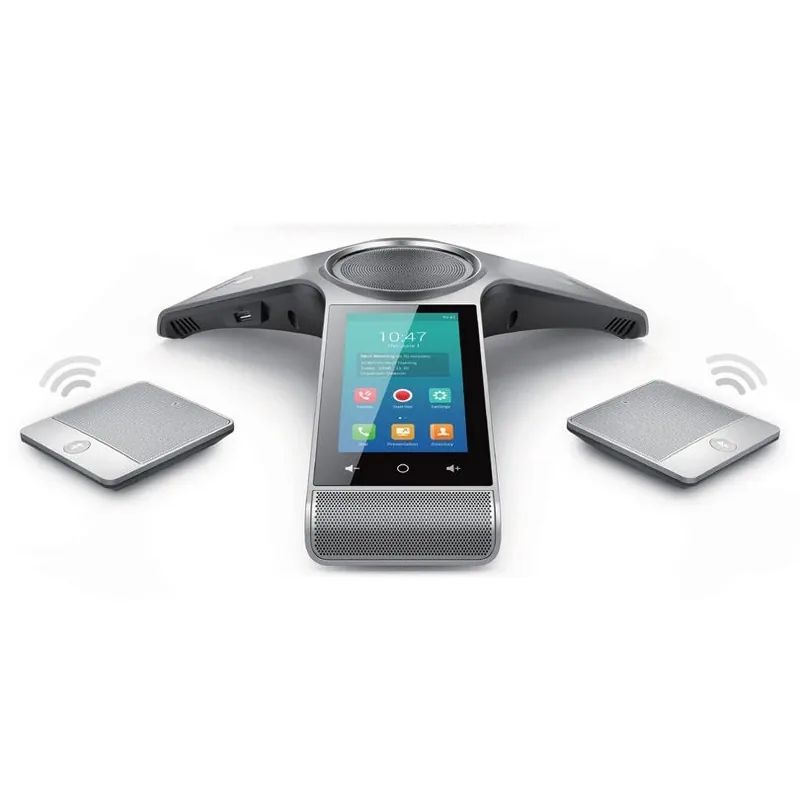
How it differs from a regular phone's speaker
Every desk phone has a speaker button. So why do you need a separate device? Try running a meeting of eight people around a table with a regular phone on speaker at one end. Whoever sits far away sounds like they are speaking from the bottom of a well, the other side hears an echo, and when someone talks while the other side is talking, one of them gets cut off.
A conference phone is built for exactly this problem. It has several microphones that cover the whole table, a strong speaker that fills the room in every direction, and a processor that filters out noise and echo. The result: everyone in the room sounds as if they are speaking close to the phone, and everyone hears the other side clearly.
The difference is felt mostly by the other side. Someone sitting in a room with a regular phone on speaker doesn't always realize how hard it is to hear them. Someone calling in from outside to such a meeting realizes it very quickly — and stops taking part. A good conference phone is what turns the person outside the room into a full participant, instead of a listener who is guessing.
What's inside
- Microphones in every direction — usually several microphones around the device, picking up a speaker from any side of the table.
- Echo cancellation — keeps the other side's voice from coming out of the speaker, being picked up by the microphone and returning to them.
- Full duplex — both sides can talk at once without one being "cut off." On a regular phone on speaker this usually doesn't work well.
- Noise filtering — air conditioner, typing, cups on the table.
- Extra microphones — many models let you connect external microphones, wired or wireless, for a long table.
- Network connection — connects to the PBX like any IP phone, and many models get power from the network cable (PoE).
How to choose by room size
| Room | Number of participants | What fits |
|---|---|---|
| Small room / manager's office | 2–4 | A good desk phone on speaker, or a small conference phone |
| Medium meeting room | 5–10 | A conference phone in the middle of the table |
| Long table / boardroom | 10–20 | A conference phone with extra microphones |
| Hall or beit midrash | More | A dedicated sound system, not a conference phone |
The rule: the microphone needs to be close to every speaker. At a long table, one device in the middle won't pick up the ends well, even if it is of very high quality.
Conference phone vs. conference room: two different things
It's easy to confuse the two. A conference phone is a device: a box on the table that lets several people in the same room talk in one call. A conference room is a service in the PBX: a virtual "room" with a number and a code, which several people call into from different places — from home, from a mobile phone, from another branch.
Combining them gives the classic hybrid meeting: some of the board sits in the meeting room around the conference phone, and the phone dials into the PBX's conference room. The other participants dial the same room from anywhere. Everyone hears everyone.
Even without a conference room, a conference phone is useful: a regular call with a customer, a supplier or a lawyer, when several people are sitting on your side.
Real-life examples
- A nonprofit board meeting — three board members in the room, two joining from home. Every week at the same time, with the same code.
- A phone shiur — the rabbi gives a shiur from a room in the yeshiva, and students and alumni listen from outside.
- A sales call — the salesperson, the technical manager and the CEO in one room, facing a customer.
- A job interview — a hiring committee of three facing a candidate who is calling in.
Tips for a good call
- Place the device in the middle of the table, not at the end and not next to a laptop with a loud fan.
- Don't cover it with papers and bags — the microphones are on the edge of the device.
- Mute when you're not speaking — in a long meeting with many participants, pressing mute saves noise.
- Introduce yourself — someone outside the room can't see who is speaking. A "This is Yossi" at the start of your remarks saves confusion.
- Test before an important meeting — a one-minute test call to another extension in the office.
Common mistakes
- Buying a large device for a small room. In a room of three people, a good desk phone on speaker is enough, and the budget can go elsewhere.
- One device for a table of twenty. The device is good, but the ends of the table are far away. Extra microphones solve this.
- A room with echo. Bare walls, a marble floor and large windows reflect sound. A curtain, a rug or panels on the wall improve the call more than an expensive device.
- A network cable that doesn't reach the table. A cable stretched across the floor does the job until someone trips on it. It's worth planning a network outlet under the meeting table.
- No one in charge. When everyone tries to dial a different way, the meeting starts late. One sheet of paper next to the device is enough: how to dial the conference room and what the code is.
How to connect it
Technically, a conference phone is an IP phone in every respect. You connect it with a network cable to an outlet in the room, and if the switch supports PoE, that cable also powers it. It registers with the PBX as an extension, and gets an extension number, a name and an outgoing caller ID.
It's worth giving the extension a clear name, such as "Floor 2 Meeting Room," so that in the call log and on the display of other phones it is clear where the call is coming from.
Room acoustics: what matters and what to do
A good device in a bad room sounds bad. Before replacing the model, it's worth understanding what the room does to the sound.
- Reverberation. Bare walls, a marble floor, a high ceiling and large windows bounce the sound back again and again. The microphone picks up the speaker and the reflections too, and the other side hears a "hall." A simple test: clap once in an empty room. If you hear a tail of sound after the clap, the room is echoing.
- What helps, in order of cost: a fabric curtain on the big window, a rug under the table, a few fabric or cork panels on the walls, a bookcase with books on one wall. You don't need a recording studio; it's enough to break up the large hard surfaces.
- Constant noise. An old air conditioner, a small fridge in the corner, a computer fan on the table. The device's filtering copes with constant noise, but anything you remove in the room doesn't have to be filtered. Before an important call, turn off whatever you can.
- Distance. A rule of thumb: every speaker within about two meters of the nearest microphone. On a table four meters long or more, one device in the middle isn't enough, and external microphones at the ends change the picture.
- The table itself. A glass table bounces sound straight to the microphone; a tablecloth or a felt pad under the device helps. Papers rustling near the microphone sound like thunder on the other side.
One tip worth more than all the others: sit on the other side once. Call the meeting room from your mobile while the team is sitting there, and listen. You'll find out within a minute what needs fixing.
Room size vs. device type
The previous table was about the number of participants. This table goes by the dimensions of the room, because in the end that is what determines where the sound reaches:
| Room | Table length | Device type | Microphones |
|---|---|---|---|
| Up to about 12 sq m (130 sq ft) | Up to 1.5 m (5 ft) | A good desk phone on speaker, or a small conference device | Built-in only |
| 12–25 sq m (130–270 sq ft) | 2–3 m (6.5–10 ft) | A standard conference phone in the middle of the table | Built-in; usually 3 microphones around the device |
| 25–40 sq m (270–430 sq ft) | 3–5 m (10–16 ft) | A conference phone with external microphones | Built-in + 2 expansion microphones at the ends |
| 40–70 sq m (430–750 sq ft) | 5 m (16 ft) and up, or a U shape | A large conference device with wireless microphones | A microphone next to every 3–4 people |
| Over 70 sq m (750 sq ft), a hall | No single table | A sound system with ceiling or handheld microphones, connected to the PBX through an adapter | Per an acoustic design |
The numbers are orders of magnitude from general knowledge, not the spec of a particular model. A room with a very high ceiling or glass walls behaves like a bigger room than its dimensions suggest.
A start-to-finish example: a hybrid board meeting
A made-up nonprofit with five board members: three in the building, one in Jerusalem and one abroad. The weekly meeting is held on Sunday at eight in the evening. Here is how it works with a conference phone in the room and a conference room in the PBX:
- Once, at setup: in the control panel you open a conference room with a code, set separate PINs for the host, speakers and listeners, and define a fixed time — every Sunday at eight, repeating weekly. The invitations go out to the board members by email or phone.
- On the evening of the meeting, 7:55 PM: the secretary in the meeting room presses a key on the conference phone that dials the room, then enters the code and the host's PIN. The member in Jerusalem and the member abroad dial the number and enter their own code and PIN.
- Anyone who joins before the host hears music. As soon as the host joins, everyone is connected.
- During the meeting: the three in the room speak freely — the device's microphones cover the table. Those outside the room say their name before they speak. When there is a vote, the chair reads the result aloud.
- A member who is late dials with the same code and joins in the middle, without stopping the meeting.
What prevents the usual mess: a fixed code that doesn't change, a time that repeats on its own, and one sheet of paper next to the device with the number and the code. After two weeks no one asks "how do I connect" anymore.
When something doesn't work: symptom, cause, fix
| The symptom | The common cause | What to do |
|---|---|---|
| The other side hears themselves as an echo | A speaker that is too loud in an echoing room, or a device placed right against a wall | Lower the speaker volume, move the device to the middle of the table, soften the room |
| Someone sitting at the end sounds far away | The distance from the microphone is more than two meters | Expansion microphones, or ask the speakers to move closer |
| When people talk at once, one gets cut off | A one-way device (not full duplex), or an aggressive filtering setting | Check that the model supports two-way speech; lower the sensitivity |
| Constant background noise on the other side | An air conditioner, a projector, a laptop with a fan next to the device | Move the device away from noise sources; use mute when you're not speaking |
| The device doesn't turn on | The switch doesn't provide PoE, or the cable is long and damaged | An external power supply, or check the cable and the switch |
| The call drops after a fixed amount of time | Usually a network problem — NAT or a firewall closing an inactive connection | Contact the provider; this is not a device fault |
Checklist before you buy
- What are the room size and the table length? (The table above)
- How many people sit in a regular meeting, and how many in the biggest one?
- Does the room echo? (The hand-clap test)
- Is there a network outlet under the table, or will there be a cable on the floor?
- Does the switch in the cabinet provide PoE, or do you need a power outlet near the device?
- Do you need expansion microphones now, or can they be added later?
- Do you also use a computer for video meetings in the same room? Many models can also be connected to a computer as a speaker and microphone, which saves duplicate equipment.
- Who is responsible for the device — who updates the instruction sheet next to it, and who reports when something isn't working?
How it works with us at Kesher
We supply Yealink conference phones for meeting rooms. The phone arrives set up as a regular extension in the PBX — you connect a network cable, and it is ready for calls.
You can combine the conference phone with the PBX's conference rooms. In the control panel you open a room with a code, set a PIN by role (host, speaker or listener), define a time and repeats — for example a board meeting every Sunday — and send invitations by email or phone.
Until the host joins, participants hear music. In a phone shiur, for example, the listeners join in advance, and the shiur starts only when the rabbi connects.
If you're not sure which model fits your room, tell us the size of the room and the number of participants, and we'll help you choose.
FAQ
What is the difference between a conference phone and a conference room?
A conference phone is a device in a meeting room that lets several people in the same room speak together. A conference room is a service in the PBX that several people from different places connect to.
Can a conference phone also be used for a regular call?
Yes. It is an extension in every respect — you dial out from it and receive calls on it like on any phone.
How many people can sit around one conference phone?
It depends on the model and the size of the table. In a medium room one device is enough, and for a long table you add external microphones.
Why does the other side hear an echo?
Usually because the speaker is too loud, the room is empty with hard walls, or the device isn't meant for conferencing. A conference phone with echo cancellation solves most cases.
Do I need a computer to run a conference phone?
No. A conference phone that connects to the network works on its own, like any desk phone: you dial from it directly, or into the PBX's conference room.
When are external microphones needed?
When there are speakers sitting more than two meters from the device — usually at a table of three meters or more, or in a room with more than ten participants. In a medium room the built-in microphones are enough.
Can a conference phone also be used for video meetings from a computer?
In many models, yes: you connect the device to a computer and it serves as the room's speaker and microphone. It's worth checking this option before you buy if the room is also used for video meetings.
Can a conference call be recorded?
The conference phone is an extension, so its calls can be included in a recording group like any other extension, and the recording appears next to the call in the log. It's important to tell the participants that the call is being recorded.