What Is a DECT Phone?
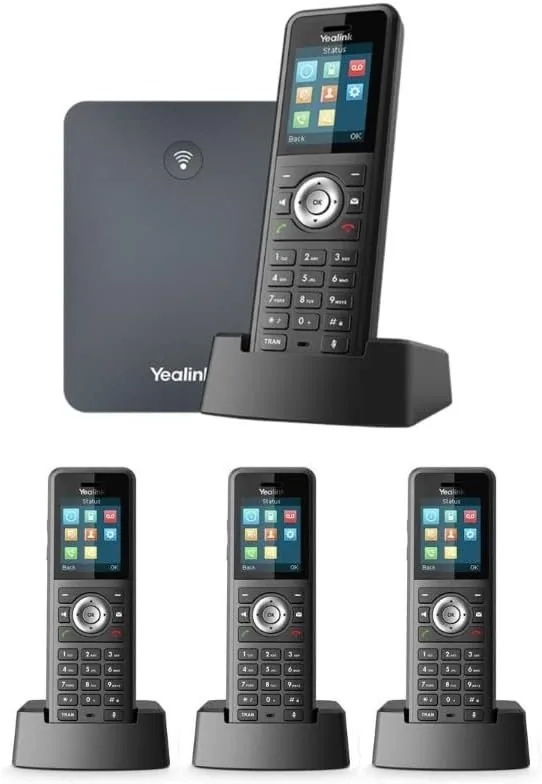
DECT (Digital Enhanced Cordless Telecommunications) is the standard that cordless phones run on: a base station is connected to the network, and handsets move around the building with it. Each handset is an extension on the PBX.
What Is DECT
DECT is a European standard for cordless phones, born in the late 1980s and widespread in the 1990s. If you had a cordless phone with a base and a handset at home, it almost certainly ran on DECT. The standard defines how the handset talks to the base: on which frequency, how it is encrypted, and how it moves from base to base.
In the business world, DECT got a more advanced version. The base station does not connect to a phone jack in the wall but to a network cable, and registers with the cloud PBX like an IP phone. The handsets connect to it over the air, and each one is an extension with its own number, name and voicemail box.
How it works
- The base station is connected by a network cable to a switch or router. Often it gets power from the same cable (PoE), so there is no need for an electrical outlet next to it.
- The base registers with the PBX on behalf of all its handsets — each handset has its own username and password.
- The handsets connect to the base over the air. They only need a charger, and it can be placed anywhere.
- When a call comes in to a handset's extension, the PBX sends it to the base, and the base rings the handset — wherever it is.
In a large building you add more base stations or repeaters. The handset moves from one to the next during a call without disconnecting — just like a mobile phone moving between antennas. This ability is called Handover.
Why Not Just Wi-Fi
There are also phones that work on the regular wireless network, and it is possible to answer from a mobile app. So why DECT at all?
- A separate frequency for voice. DECT works on its own frequency, intended for phones only. It does not compete with computers, mobile phones and cameras on the Wi-Fi, so the call does not break up when someone downloads a large file.
- Long battery life. A DECT handset usually lasts days on standby. A Wi-Fi phone or a mobile with an app runs out faster.
- Range and durability. One base usually covers tens of meters inside a building, and more in open space. Thick concrete walls and metal shorten the range.
- Simplicity. A handset with keys, without a touch screen, notifications or apps. It also suits people who don't like technology.
Where It Fits
- Warehouse and factory — the worker is among the shelves, and the call reaches them without running to a desk.
- Event hall and kitchen — the shift manager is reachable at any moment.
- Synagogue — the gabbai or the shamash answers from anywhere in the building.
- Yeshiva and dormitory — a mashgiach walking between buildings, a dorm manager, a building superintendent.
- Open office — whoever gets up from the desk to a meeting room takes the handset along.
- Clinic and kindergarten — the staff is constantly moving between rooms.
Example: the superintendent of a large yeshiva gets calls from the kitchen, the office and suppliers. With a DECT handset on his belt, he answers on the same extension from anywhere on campus, and if he is on a call, the next call goes to voicemail or to his mobile.
Planning Coverage in a Building
The most common mistake is to assume that one base will cover everything. In a private home that is true; in a three-story building with concrete walls, it is not.
- Place the base in the center, not in the communications closet in the corner. If needed, run one network cable to a better spot.
- Walk through the building with a handset and check the quality in every room, on the stairs and in the yard. Many handsets show the signal strength.
- Add a base or a repeater in weak areas: a basement, an upper floor, a separate building.
- Pay attention to materials. Refrigerators, metal cabinets and elevators block the signal.
Advantages and Limitations
| Advantages | Limitations |
|---|---|
| Freedom to move around the building | Works only within range of the base stations |
| Battery that lasts days | You have to remember to put it back on the charger |
| Doesn't load the Wi-Fi | Fewer keys and functions than a desk phone |
| A simple, durable handset | Handsets get dropped and broken — consider a protective cover |
Outside the building — on the street, at home, while traveling — DECT doesn't help. For that there is a mobile app or a SIM extension. And you can combine them: the same extension can ring both on a DECT handset and on a mobile.
Common Mistakes and What to Check
- One handset for several people. It is convenient on the first day and confusing later: you can't tell who answered, and the voicemail box is shared. It is better to have a handset and an extension for each person.
- A charger in an inaccessible place. A handset that doesn't go back on the charger runs out in the middle of the day. Put a charger somewhere people pass by.
- A base inside a metal cabinet. The communications closet is the worst place for a base — the metal blocks the signal.
- Forgetting the yard. If the employee goes out to the parking lot or to an outdoor storage room, check the reception there.
- No destination when there's no answer. Someone walking around the building doesn't always hear it. Define what happens after a number of rings — voicemail, a mobile or another extension.
DECT, Wi-Fi or an App
| DECT | Wi-Fi phone | Mobile app | |
|---|---|---|---|
| Where it works | Within range of the base stations | Within range of the wireless network | Anywhere with internet |
| Battery | days | Shorter | Depends on the mobile |
| Load on the network | No | Yes | Yes, inside the building |
| Best for | Employees who move around the building | Special cases | Employees outside the building |
Coverage Planning in Depth: Numbers and Rules of Thumb
The range printed on the box — sometimes hundreds of meters — is measured in open space, with line of sight. Inside a building the numbers are completely different, and these are orders of magnitude you can plan around (general knowledge, which varies by model and building):
- One floor, drywall walls: one base usually covers a few dozen meters in every direction — an ordinary office in its entirety.
- Concrete or block walls: each wall "eats" a large part of the signal. After two or three such walls the reception is already borderline.
- Between floors: the base covers its own floor and partly the floor above and below. A thick concrete ceiling can block it almost completely, so in a four-story building you plan at least one base for every two floors.
- Metal and coated glass: metal shelves in a warehouse, industrial refrigerators in a kitchen, electrical cabinets and coated windows block or reflect the signal. Behind them, "holes" form in the coverage even a short distance from the base.
A repeater or another base? A repeater is a box that receives the signal from the base and transmits it onward, without a network cable — it only needs an electrical outlet. It is cheap and simple, but it has two costs: it shares the capacity of the base behind it (it doesn't add simultaneous calls), and usually only one or two repeaters can be chained before quality drops. An additional base needs a network cable, but adds both coverage and capacity. Rule of thumb: a repeater for one weak corner; an additional base for a whole floor or wing.
Capacity. Dozens of handsets can register to a base, but the number of simultaneous calls through one base is limited — usually from a few calls up to about ten, depending on the model. In an institution where twenty staff members talk at the same time, you plan several bases even if the coverage is enough.
A multi-cell system. When there are several bases, it is important that they are synchronized with each other, so that the handset moves between them in the middle of a call without disconnecting. Individual bases that each work alone don't provide that: the handset "belongs" to one base, and outside its range it is simply disconnected.
A survey before buying. Many handsets have a survey mode that shows the signal strength in numbers. Walk through the whole building with one handset and a temporary base, including stairwells, storage room, shelter and yard, and mark on the building plan where it is weak. Only then decide how many bases and where.
Three Planning Examples
A 2,000 sq. m warehouse with metal shelves. One base on the ceiling in the center of the warehouse covers everything on paper, but the shelves create long rows of "shadow". In practice you plan two synchronized bases at the two ends of the warehouse, high up, above the shelves, plus a small repeater in the warehouse office, which is separated by a block wall. Three handsets for the staff, and one on a charger by the loading door. The warehouse extension goes into a hunt group: first the handsets, and if nobody answers after half a minute — the main office.
An event hall with a kitchen and a basement. Three different environments: a large open hall (easy), a kitchen with refrigerators and stainless steel covers (hard), and a storage basement under concrete (impossible from the hall). One base in the hall, a second base at the kitchen entrance, and a repeater at the stairs down to the basement. The event manager, the chef and the maintenance man each get a handset. On a day with no event, these extensions don't ring at all: time-based routing sends the calls to the office.
A yeshiva building: four floors and a dormitory in a nearby building. A mashgiach, a superintendent and a secretary — all three are on the move all day. In the main building two synchronized bases are enough (first and third floors). The nearby building is the problem: a DECT signal doesn't like crossing a yard and two exterior walls. Instead of a repeater "on the border", you run one network cable to the dormitory building and place a third base there, synchronized with the other two. The result: the mashgiach leaves the beit midrash, crosses the yard and enters the dormitory — and the conversation with the parent continues. And at night, an unanswered call to the mashgiach goes to his mobile, not to voicemail.
DECT, Wi-Fi Phone or SIM Extension
| DECT | Wi-Fi phone | SIM extension | |
|---|---|---|---|
| Required infrastructure | Bases on a network cable | Quality wireless network throughout the building | Nothing — works on the cellular network |
| Where it works | Within range of the bases | Within Wi-Fi range | Anywhere with cellular reception |
| Quality under load | Stable — dedicated frequency | Depends on what else is happening on the network | Like any mobile call |
| Battery | days | Hours to a day | Of the mobile |
| Suitable for a kosher mobile | Not relevant — a separate device | No | Yes, with no app and no data usage |
| During a power outage in the building | Goes down without a UPS for the base | Goes down without a UPS for the network | Keeps working |
| Best for | Staff who move around inside the building | Special cases, when you already have excellent Wi-Fi | Someone who is also outside the building |
In practice, many institutions combine them: DECT for staff inside the building, and a SIM extension for a manager who is on the road half the day. Both are regular extensions on the same PBX, and you can put them in the same hunt group.
When something doesn't work: symptom, cause, fix
| The symptom | The common cause | What to do |
|---|---|---|
| Choppy audio in a certain corner of the building | Edge of the range, or metal blocking the signal | Check with a survey; add a repeater for the corner or move the base |
| The call drops when moving between floors | Two bases that are not synchronized, or a coverage gap in the stairwell | Make sure the bases are in the same system; check reception in the stairwell |
| The handset shows "Searching" or "No base" | The base is off, lost its network connection or disconnected from the PBX | Check the lights on the base and the status of the extensions in the control panel |
| Can't register a new handset | You reached the maximum number of handsets, or the base is not in registration mode | Check the number of handsets the model supports; add a base |
| The battery runs out in the middle of the day | An old handset, or it isn't put back on the charger | Replace the battery; move the charger to a place people pass by |
| Noise or interference in one area | Another DECT system in a nearby building, or equipment transmitting on the same frequency | Move the base; on most bases you can restrict channels |
How it works with us at Kesher
We install Yealink cordless phones from the W79 series: a base station that connects to the network, and handsets that are each set up as a separate extension. The equipment arrives preconfigured — you connect the base, put the handsets on the charger, and they are ready.
In large buildings we check the coverage first and add stations as needed, so the call won't break up when moving between wings.
In the "Extensions" screen in the control panel you see each handset as a regular extension: whether it is registered, from which device, and what happens when it isn't answered. You can add it to a hunt group or a queue, and set it to ring together with the same employee's mobile.
And if there isn't yet a network point in the right place for the base, we set up the infrastructure: a cable from the closet, a PoE switch that powers the base, and a UPS that keeps it running during a power outage.
FAQ
What is the range of a DECT phone?
Usually a few dozen meters inside a building, and more in open space. Concrete walls, metal and floors shorten the range, so in a large building you add base stations.
Can I transfer a call from a DECT handset to another extension?
Yes. It is a full extension: you transfer, hold and dial other extensions just like on a desk phone.
Does DECT work without internet?
Communication between the handset and the base doesn't need internet, but the base needs a connection to the cloud PBX to make and receive calls.
How long does the battery last?
Usually days on standby and many hours of talk time, depending on the model. In practice, someone who puts the handset back on the charger at the end of the day never gets stuck.
Can I add handsets to an existing base?
Yes, up to the number of handsets the base supports. Each new handset registers to the base and gets its own extension on the PBX, and if you've reached the limit — you add a base.
How many simultaneous calls can one DECT base handle?
Fewer than the number of handsets registered to it. Usually from a few calls up to about ten, depending on the model. If the staff talk a lot at the same time, you plan several bases even when the coverage is enough.
A DECT repeater or another base — which is better?
A repeater suits one weak corner: it is cheap and only needs power, but it shares the base's capacity. For a whole floor or wing, an additional base on a network cable, synchronized with the others, is better.
Does DECT interfere with Wi-Fi, or the other way around?
No. DECT works on its own dedicated frequency, separate from the wireless network frequencies. That is why a call on a handset isn't affected when someone downloads a large file, and the base doesn't slow down the computers.